Licensing
Conio has a permanent Free tier and paid tiers, Solo and Office, that unlock the AI features. Solo and Office unlock the same features. They differ in the number of devices and in project size limits (see below). Older licences may still say "Pro" or "Enterprise"; they behave like Solo or Office.
Tier comparison
| Capability | Free | Solo / Office |
|---|---|---|
| Import BOQ and rate tables | ✓ | ✓ |
| Match All, deterministic scoring (ranked candidates, no AI) | ✓ | ✓ |
| Manual matching, overrides, approve and unmatch | ✓ | ✓ |
| Rule-based URA draft (no AI) | ✓ | ✓ |
| Scenario and project database management | ✓ | ✓ |
| Resource price book and URA spreadsheet | ✓ | ✓ |
| Full CPM schedule, Gantt, splits, calendar, S-curve, manual links | ✓ | ✓ |
| Export (CSV, MS Project, Excel, Power BI) | ✓ | ✓ |
| AI Refine and Keyword Indexing | On-device model only, up to 100 BOQ items | Any provider |
| AI tiebreaker inside Match All | — | ✓ |
| AI Generate URA (single item and batch) | — | ✓ |
| Coverage Analysis & Template Seeding | — | ✓ |
| AI schedule sequencing (AI Schedule, Refine Selection) | — | ✓ |
| Cloud AI providers, provider switching, AI task routing presets | — | ✓ |
A Free user can import a BOQ, match items with ranked candidates, draft unit rates with the rule-based generator, tidy descriptions with the on-device model, build the schedule by hand and export to MS Project or Excel. The reason to upgrade is cloud AI: resolving close matches, building unit rates from your price book, sequencing a programme and classifying coverage across hundreds of items at once, at cloud speed.
On Free, every AI task runs on the bundled Local AI model. A cloud API key saved earlier is ignored. Choosing Local AI never changes what your tier unlocks; the features above are tied to your licence, not to the provider.
Project size limits
The AI tools are limited by project size: 100 BOQ items on Free, 300 on Solo (by default) and no limit on Office. This applies to AI Refine and Keyword Indexing on BOQ tables, and on Solo also to the AI batch tools (Match All, Batch URA, Coverage Analysis, Template Seeding). Importing, deterministic matching, scheduling and exporting are never limited by item count, on any tier. If a project is bigger than the limit, the tool tells you instead of running. Your supplier can set a different limit on a Solo or Office licence.
Identifying your current tier
The tier badge in the left sidebar is always visible.

Activating a license
- Obtain a license token from your supplier (sent by email when your license is issued).
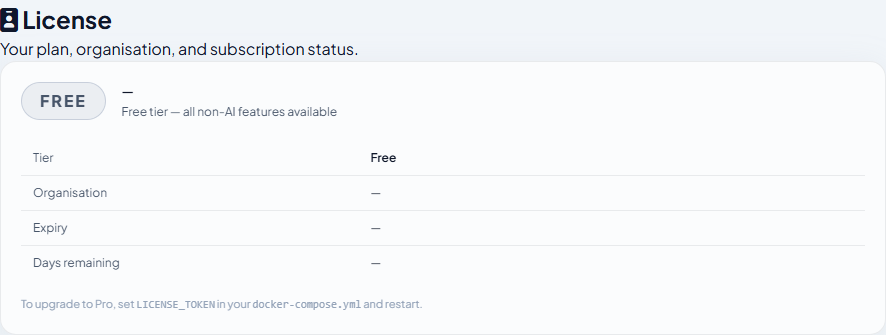
- In Conio, click Settings in the sidebar, then select License.
- Paste the token into the token field and click Activate.
- The sidebar badge changes to your tier (for example SOLO) and the License panel shows your organisation name and expiry date — no restart needed.
Trial licenses
A trial is a paid license with a future expiry date, with the same activation steps. The Settings → License panel shows the number of days remaining.
| Period | Behaviour |
|---|---|
| During trial | Full paid tier, all AI features active |
| After the expiry date | At the next successful check with the licence server, the licence downgrades to Free. All data stays accessible and exportable |
Renewal is handled by your supplier, who updates the expiry server-side. No action is required from you — the app picks up the extension on its next 24-hour validation check.
AI feature gate on Free tier
When you click a cloud-AI button without a Solo or Office licence, Conio shows an inline upgrade prompt instead of making any AI call. No quota is consumed and no error is shown. AI schedule sequencing is the exception: on Free the server declines the request and the AI Schedule dialog shows its message instead of the upgrade prompt.

Offline grace
Both license validation and version checks cache their last successful result locally. If your internet connection is unavailable:
- The cached result is honoured for 7 days.
- After 7 days offline without a successful re-validation, your licence downgrades to Free until connectivity is restored.
- The app itself never locks — all data remains accessible and exportable regardless of license state.